


SwiftSync 4K60Hz HDMI® USB/Audio/RS232/IR KVM over IP Encoder/Decoder Set - TAA Compliant
SKU: HKM02B-4K6G
Call For Availability
Contact us for project pricing or out-of-stock orders, and we’ll secure them quickly for you.
Description
Package
Specification
FAQ
Download
Connection Diagram
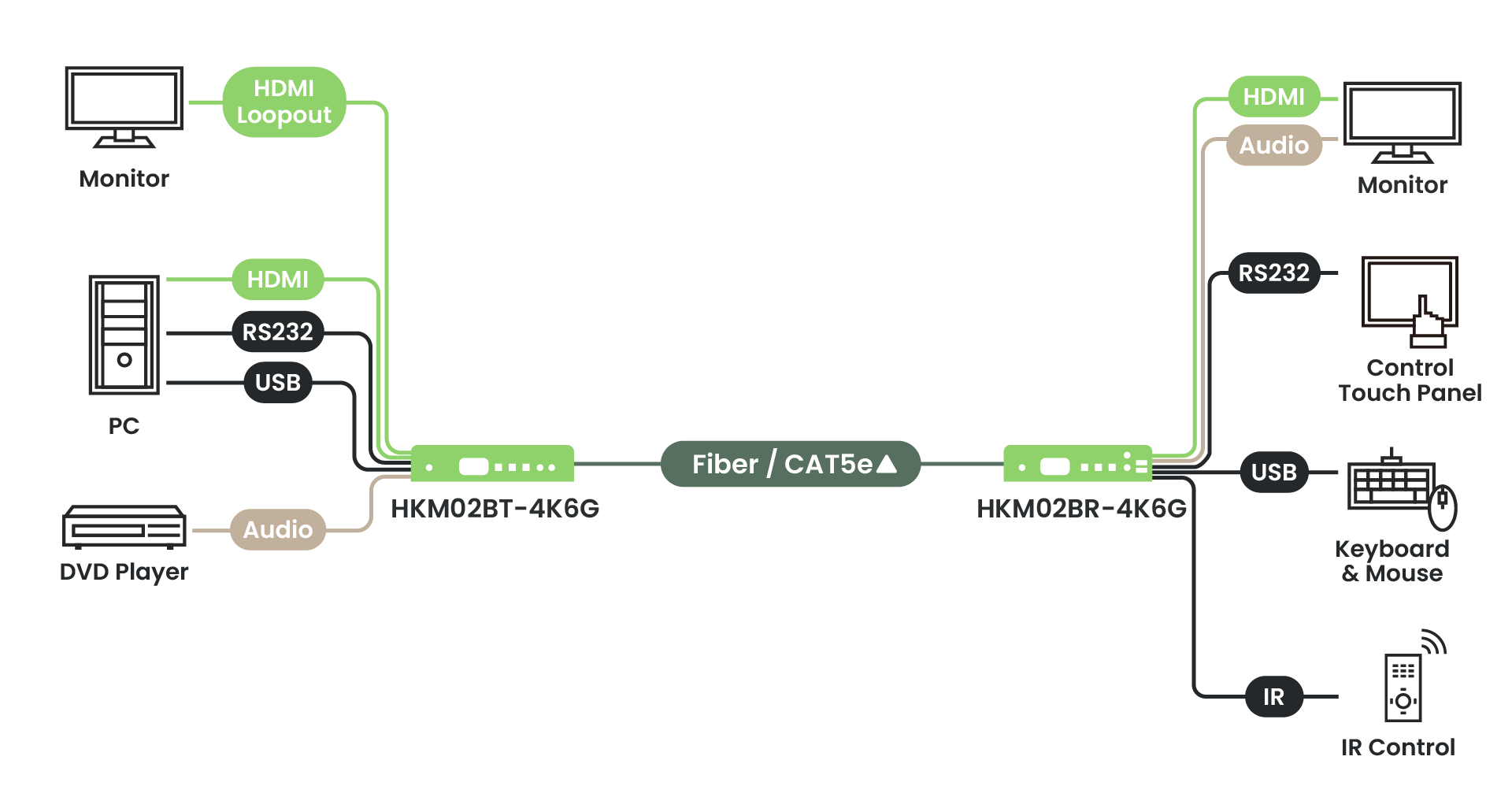
Multi Mode 1
_V1.0.png)
Multi Mode 4
_V1.0.png)
With SR01X
_V1.0.webp)
Overview
The HKM02B-4K6G is a 4K60Hz, highly flexible HDMI® KVM Matrix system that supports a 1G Ethernet switch designed to scale with your project. Available in 1080P (HKM02B), 4K30Hz (HKM02B-4K), or 4K60Hz (HKM02B-4K6G), it allows you to customize the exact number of Encoders and Decoders based on your site requirements. Featuring dual-medium support for both CAT5e/6 and fiber-optic transmission, it seamlessly adapts to any infrastructure. With integrated Mouse Roaming, operators can control multiple PCs by simply moving the cursor across monitor borders. It is the perfect all-in-one solution for Response/Control Centers, large-scale security, and mission-critical routing.


Explore the full AV over IP Extender series

Features
Flexible, Customizable Video Wall

Mouse Roaming for Seamless Multi-PC Control
Streamline your workflow with Mouse Roaming. Control multiple PCs using a single keyboard and mouse by simply moving the cursor across monitor borders. This hardware-based switching eliminates hotkeys, providing intuitive, real-time multitasking—perfect for enhancing efficiency in high-pressure Response Centers and mission-critical environments.

Multiple Control Options
Multiple control options to meet different project requirements.

RS232 for Customized Control
Use the RS232 command list provided in the SC&T user manual to build a customized control interface.

Long-Lasting Durability
Built-in circuit protection components to prevent the devices from surge spikes.

Ethernet Switch Requirement
HKM02B series requires a managed switch that supports IGMP and Jumbo Frames.
USB-C (DP Alt Mode) / DisplayPort Input Support

Compatible with USB-C (DP Alt Mode) / DP input models (UDPKM02B-4K6G) to support different application scenarios.
Optional 1U Rack-Mount Kit

For control rooms and AV racks, the 1U rack panel helps keep multiple SC&T devices aligned and easier to maintain.
- Designed for selected SC&T device sizes for cleaner rack organization
- Easy installation with included screw set and illustrated manual
- Standard 19" rack format, 1U height
Installation Tutorial for SC&T AV over IP Systems
In this video, you will learn how to install the AV over IP system and different control methods:
- Set up Jumbo Frame and IGMP Snooping on the switch
- Set the Tx channel via one of the following methods:
1. Use the device buttons/rotary switch
2. Enter the RS232 command using PuTTY/RS232 software
3. Use the remote control with the screen panel/RS232 software
By following the steps, you can easily set up the video matrix and control it using different methods, such as a remote control or software.
In this video, you can learn how to set up the video wall with the mobile app:
- Add Host and Client devices in minutes
- Rename devices for quick identification
- Route any source to the video wall with flexible layout control
- Save preset layouts for fast recall and easier setup
Benefits
- Multiple control options for different project requirements
- Budget-friendly 1G network architecture
- Supports both CAT cable and fiber for flexible distance planning
- Supports a wide range of USB 2.0 devices, such as USB flash drives and webcams
AV-over-IP Series Comparison Table

| ITEM NO. | HKM02BT-4K6G | HKM02BR-4K6G |
Support
| Standard | HDMI® 2.0, HDCP 2.2 |
| Max. Video Resolution | 4K60Hz |
| Max. Transmission Distance | Point to point, 160m over CAT5e, 20km over fiber optic. Through Ethernet Switch, 100m over CAT5e, 20km over fiber optic each side |
| Dynamic Range Standard | SDR, HDR, HDR10, HDR10+, Dolby Vision |
| Audio Format | PCM 2CH, 5.1CH, 7.1CH Dolby True HD, Dolby Digital (AC-3), Dolby Digital Plus (E-AC-3), Dolby Atmos (AC4) DTS, DTS-HD Master Audio, DTS: X |
| Analog Audio | Impedance: 500Ω Signal-to-noise Ratio (SNR): 114dB (A-weighted) Dynamic Range: 114dB THD+N: -94dB |
| RS232 Baud Rate | 115200 bps |
| IR Support | 20-60 Khz, ±45°, 5M |
Ports & Interfaces
| Video Input | 1 x HDMI Type A | 1 x RJ45 |
| Video Output | 1 x RJ45 | HDMI Type A |
| Video Loop-out | 1 x HDMI Type A | - |
| Analog Audio Output | - | Terminal Block 5-Pin |
| USB Interface | 1 x USB Type B (USB 2.0) | 2 x USB Type A (USB 1.1) 2 x USB Type A (USB 2.0) |
| IR | External Transmitter: 3.5mm Stereo Phone Jack: 20~60KHz / ±45° / 5M |
External Receiver: 3.5mm Stereo Phone Jack 20~60KHz / ±45° / 5M |
| RS232 | 1 x 3.5mm Phone Jack | 1 x 3.5mm Phone Jack |
Power
| Power Supply | 12V 1.5A | 12V 1.5A |
| Power Consumption | 5.5W | 4.1W |
| Power Saving | 1.9W | 2.05W |
Ambient Temperature
| Operation | 0 to 55℃ |
| Storage | -40 ~ 80℃ |
| Operating Altitude | 2000m |
| Humidity | Up to 95% |
Physical Characteristic
| Dimensions | 124 x 189 x 42mm | 124 x 189 x 42mm |
| Weight | 840.1g | 840.6g |
Firmware/Software
| Release Date | Ver. | Release Note | File Name |
| January 6, 2026 | V1.0_2601061 | 2026/01/06 Release Version V3.10 Platform: ARM (Nuvoton NUC100) RS232 Baud Rate: 115200 bps ------------------------------ 01.Fix RS232 command: CHANNEL x NAME CLR cannot be clear 02.Fix CEC control support |
HKM02B(P)T-4K6G_Firmware_V1.0_2601061.zip |
| January 6, 2026 | V1.0_2601061 | 2026/01/06 Release Version V3.10 Platform: ARM (Nuvoton NUC100) RS232 Baud Rate: 115200 bps ------------------------------ 01.Fix RS232 command: CHANNEL x NAME CLR cannot be clear 02.Fix CEC control support |
HKM02B(P)R-4K6G_Firmware_V1.0_2601061.zip |
| June 3, 2025 | V1.0_2506031 | 2025/05/26 Release Version V3.07 Platform: ARM (Nuvoton NUC100) RS232 Baud Rate: 115200 bps ---------------------------------- 01.Fix RS232 command: CHANNEL x NAME "yyy" get error message and cannot be set |
HKM02BT-4K6G_Firmware_V1.0_2506031.zip |
| June 3, 2025 | V1.0_2506031 | 2025/05/26 Release Version V3.07 Platform: ARM (Nuvoton NUC100) RS232 Baud Rate: 115200 bps ---------------------------------- 01.Fix RS232 command: CHANNEL x NAME "yyy" get error message and cannot be set |
HKM02BR-4K6G_Firmware_V1.0_2506031.zip |
| April 24, 2025 | V1.0_2504241 | 2025/04/14 Release Version V3.06 Platform: ARM (M251) RS232 Baud Rate: 115200 bps ------------------------------------------------------------------------------------------------------------ 01. Update MCU firmware to be compatible with CORE V9.19.4 |
HKM02BT-4K6G_Firmware_V1.0_2504241.zip |
| April 24, 2025 | V1.0_2504241 | Platform: ARM (M251) RS232 Baud Rate: 115200 bps ------------------------------------------------------------------------------------------------------------ 01. Update MCU firmware to be compatible with CORE V9.19.4 |
HKM02BR-4K6G_Firmware_V1.0_2504241.zip |
| August 6, 2024 | V1.0_2408061 | 2024/08/06 Release Version V3.05 Platform: ARM (Nuvoton NUC100) RS232 Baud Rate: 115200 bps 01. Fixed USB stability issue 02. When saving the VIDEOWALL setting parameters, save them together with CHANNEL, GROUP, PARTY, and apply them when loading VIDEOWALL. |
HKM02BT-4K6G_Firmware_V1.0_2408061.zip |
| August 6, 2024 | V1.0_2408061 | 2024/08/06 Release Version V3.05 Platform: ARM (Nuvoton NUC100) RS232 Baud Rate: 115200 bps 01. Fixed USB stability issue 02. When saving the VIDEOWALL setting parameters, save them together with CHANNEL, GROUP, PARTY, and apply them when loading VIDEOWALL. |
HKM02BR-4K6G_Firmware_V1.0_2408061.zip |
SC&T Brand
Founded in 2002 in Taiwan, Smart Cabling and Transmission (SC&T) is a brand specializing in transmission equipment for system integration. Our mission is to simplify complex installation processes, optimize the use of existing cabling, and deliver durable, high-quality solutions that reduce maintenance costs and prevent the need for secondary construction.
Learn about SC&T’s background, our mission for hassle-free installation, and how we support projects worldwide.
Learn more